

Kairo Insights WordPress Theme
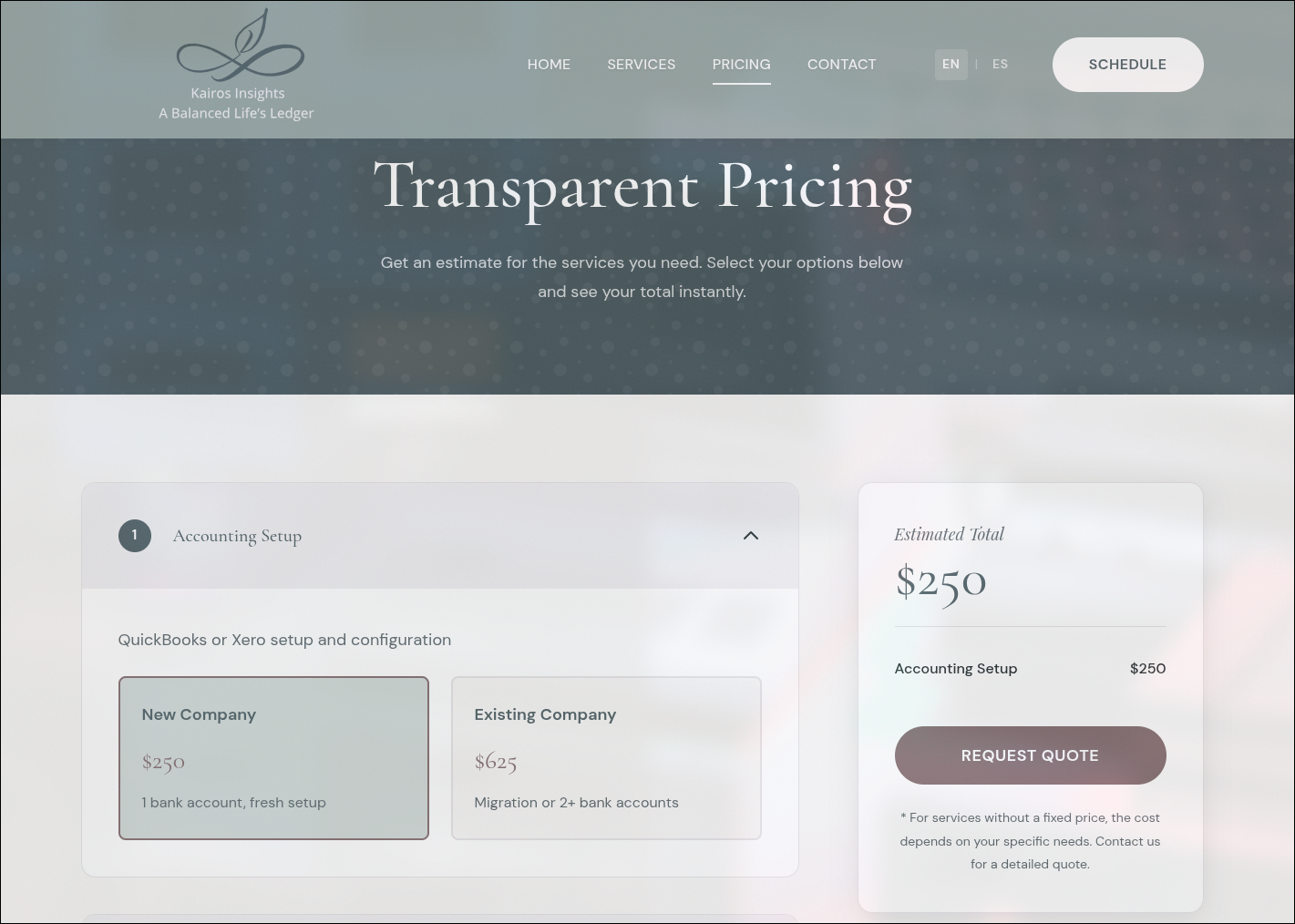
A custom WordPress theme built for Kairos Insights, an accounting, tax, and advisory services firm based in Houston, Texas. The theme features an interactive pricing calculator that enables clients to estimate service costs in real-time, full English/Spanish bilingual support with seamless language switching, and a comprehensive admin interface powered by Secure Custom Fields for complete content management without code changes.
Key Features
- Interactive Pricing Calculator - JavaScript-powered calculator with animated totals, collapsible service sections, and real-time price breakdown that allows potential clients to estimate accounting, tax preparation, and bookkeeping costs before scheduling a consultation
- Bilingual Support (English/Spanish) - Complete internationalization system with language detection from browser preferences, cookie-based persistence, URL parameter switching, and duplicate SCF fields for Spanish translations across all content sections
- CMS-Driven Content Management - Over 650 lines of Secure Custom Fields definitions enabling administrators to modify all homepage sections, pricing options, service offerings, and footer content through WordPress admin without developer involvement
- Schema.org Structured Data - Comprehensive JSON-LD markup for AccountingService, Service catalog, FAQPage, and WebPage schemas optimized for search engines and AI-powered search tools, with dynamic pricing data pulled from CMS fields
- Performance-Optimized Asset Loading - LCP image preloading, font preconnect hints, file-based cache busting via
filemtime(), and Google Fonts withdisplay=swapfor optimal Core Web Vitals scores - Responsive Mobile Navigation - Slide-out mobile menu with overlay, keyboard accessibility (Escape to close), scroll locking, and smooth anchor link navigation with header offset compensation
- Dynamic Service Configuration - Repeater-based service cards with SVG icon support, per-service pricing links, and independent Spanish translations enabling unlimited service offerings through the admin panel
- Margin Pricing System - Configurable percentage-based margin applied to all calculator prices, allowing the business to adjust profit margins without modifying individual service prices
Technical Implementation
Calculator Architecture
The pricing calculator implements a state-driven architecture that separates data, UI, and business logic:
Data Flow: PHP retrieves pricing options from SCF fields via kairo_get_calculator_data(), applies the configured margin percentage using the formula Sale Price = Cost / (1 - Margin%), then passes the processed data to JavaScript via wp_localize_script(). This ensures all pricing logic remains server-side while the frontend handles only presentation and interaction.
State Management: The calculator maintains an internal state object tracking selected options across setup fees, monthly services, tax preparation, add-ons, and 1099 quantities. Each user interaction updates the state and triggers a recalculation:
const state = {
  setup: 0,
  monthly: 0,
  tax: 0,
  addons: { estimated: false, salesTax: false, fbar: false, itin: false },
  form1099: 0
};
Deselectable Radio Buttons: The calculator implements custom deselection behavior for radio button groups, allowing users to uncheck a selected option by clicking it again. This provides a better UX for optional service selections compared to standard HTML radio behavior.
Animated Totals: Price changes trigger eased animations using requestAnimationFrame with cubic easing (1 - Math.pow(1 - progress, 3)), creating smooth visual feedback as the estimated total updates.
Internationalization System
The bilingual system operates across three layers:
PHP Layer: The kairo_get_current_lang() function determines language from URL parameters, cookies, or defaults to English. The kairo_get_field() wrapper first checks for Spanish-suffixed field values (e.g., hero_title_es) when in Spanish mode, falling back to English if empty. This enables partial translations where only key content needs localization.
JavaScript Layer: A kairoI18n object is localized to the frontend containing the current language code and a translation string dictionary. The __() function provides runtime string lookup for calculator labels, form messages, and dynamic UI text.
Cookie Persistence: Language preference is stored in a 30-day cookie, ensuring returning visitors see their preferred language without requiring URL parameters. The system also detects browser language on first visit and automatically redirects Spanish-speaking users to the Spanish version.
Custom Fields Architecture
The theme registers three major field groups through SCF/ACF:
Site Settings (Options Page): Global configuration including logos (with optional Spanish variant), footer contact info, legal disclaimers, Google Calendar embed code, Contact Form 7 shortcode references, and designer credit. All fields have Spanish counterparts for bilingual output.
Home Page Content: Hero section (tagline, title lines, CTAs, image), values cards (repeater with SVG icons), services (repeater with icon, title, items list, pricing link), featured service highlight, and contact section. Each text field has a Spanish translation sibling.
Pricing Page Content: Calculator section titles and descriptions, setup/monthly/tax option repeaters with name/price/description fields, add-on services with JavaScript keys, margin percentage, and quote-only sections for complex services (financial reporting, assurance, ITIN applications, entity structuring).
CSS Design System
The stylesheet implements a comprehensive design token system using CSS custom properties:
:root {
  --color-primary: #1a365d;
  --color-accent: #c9a227;
  --font-display: 'Cormorant Garamond', serif;
  --font-body: 'DM Sans', sans-serif;
  --space-unit: 0.25rem;
  --text-base: 1rem;
}
The BEM methodology structures all components (.header__logo, .btn--primary, .calc-section__header), enabling predictable specificity and maintainable CSS. Responsive breakpoints use a mobile-first approach with media queries at 768px and 992px for tablet and desktop layouts.
Schema.org Implementation
The theme outputs three types of structured data for SEO and AI search optimization:
AccountingService Schema: Organizational information including service types, knowledge areas (QuickBooks, Xero, tax planning), area served (Houston, Texas), and price range indicator.
Service Catalog Schema: Dynamic OfferCatalog with itemized service offerings pulled from calculator pricing fields, including setup fees, monthly bookkeeping tiers, and tax preparation options with actual prices and USD currency.
FAQPage Schema: Common questions about bookkeeping costs, tax preparation fees, QuickBooks setup, and ITIN/CAA services with detailed answers, targeting featured snippet opportunities for accounting-related searches.
Business Impact & Client Value
Administrative Efficiency
The comprehensive SCF field system enables the client to:
- Update all homepage messaging, CTAs, and service descriptions without developer support
- Adjust pricing across all calculator options through a single admin interface
- Toggle featured services on/off and modify their content seasonally
- Manage Spanish translations alongside English content in the same editing flow
- Configure contact form integration and calendar embedding through WordPress admin
This self-service capability eliminates ongoing development costs for routine content updates.
Lead Generation Optimization
The interactive pricing calculator serves as a lead qualification tool:
- Potential clients arrive with realistic price expectations, reducing tire-kicker inquiries
- The “Request Quote” CTA captures interested prospects after they’ve explored pricing
- Deep-linked calculator sections (e.g.,
/pricing/#tax-services) enable targeted marketing campaigns - Schema.org pricing data may appear in AI-generated search responses, increasing visibility
Bilingual Market Reach
Houston’s significant Spanish-speaking population makes bilingual support essential for local accounting services:
- Automatic browser language detection welcomes Spanish speakers immediately
- Shared URL structure with
?lang=esparameter enables targeted Spanish advertising - Consistent branding across languages with optional separate logos for Spanish market
- Legal disclaimers and footer content available in both languages for compliance
Development Practices & Architecture
Theme Structure & Organization
kairo/
├── assets/
│   ├── css/styles.css      # 1500+ lines, BEM methodology
│   ├── js/main.js          # 720+ lines, vanilla JS modules
│   └── images/
├── inc/
│   ├── theme-setup.php     # WordPress hooks, menus, support
│   ├── i18n.php            # Translation helper functions
│   ├── scf-fields.php      # 1670+ lines of field definitions
│   └── populate-spanish.php # Spanish translation seeding
├── template-parts/
│   ├── section-hero.php
│   ├── section-values.php
│   ├── section-services.php
│   ├── section-calculator.php
│   └── [8 more template parts]
└── functions.php           # Asset enqueuing, helpers
Security Practices
All output uses WordPress escaping functions:
esc_html()for text contentesc_url()for links and image sourcesesc_attr()for HTML attributeswp_kses_post()for rich text with allowed HTML
Direct file access is prevented with defined('ABSPATH') checks in all PHP files.
Performance Considerations
- No Build Tools: CSS and JavaScript are served directly without bundling overhead, suitable for the theme’s scope
- Asset Versioning:
filemtime()generates cache-busting version strings that automatically update when files change - Conditional Loading: Calculator data is only localized to JavaScript on the pricing page
- Font Loading Strategy: Google Fonts loaded with preconnect hints and
display=swapto prevent FOIT - LCP Optimization: Hero image preloaded with
<link rel="preload">for faster largest contentful paint
Accessibility Enhancements
- Semantic HTML structure with
<main>,<nav>, and proper heading hierarchy - Skip-to-content link for keyboard navigation
- Aria labels automatically added to Contact Form 7 inputs lacking explicit labels
- Mobile menu responds to Escape key for keyboard dismissal
- Google Calendar iframes receive descriptive title attributes
Technical Challenges Addressed
Deselectable Radio Button UX
Standard HTML radio buttons cannot be deselected once selected. The calculator required this behavior for optional service selections. The solution intercepts click events on radio labels, checks if the clicked option matches the current state, and programmatically unchecks it if so:
label.addEventListener('click', (e) => {
  if (state[stateKey] === value) {
    e.preventDefault();
    input.checked = false;
    state[stateKey] = 0;
    updateTotal();
  }
});
Sticky Total Panel with Boundaries
The calculator total panel needed to stick to the viewport while scrolling but stop at the calculator wrapper’s bottom edge. Pure CSS position: sticky couldn’t enforce the bottom boundary. JavaScript calculates the wrapper’s position relative to the viewport and switches between fixed and absolute positioning as needed:
if (wrapperTop < headerHeight && maxTop > headerHeight) {
  calcTotal.style.position = 'fixed';
  calcTotal.style.top = headerHeight + 'px';
} else if (maxTop <= headerHeight) {
  calcTotal.style.position = 'absolute';
  calcTotal.style.bottom = '0';
}
Language-Aware Field Retrieval
The kairo_get_field() wrapper needed to check for Spanish translations only when appropriate, avoid unnecessary database queries, and fall back gracefully:
function kairo_get_field($field_name, $post_id = false) {
    if (kairo_is_spanish()) {
        $spanish_value = get_field($field_name . '_es', $post_id);
        if ($spanish_value) return $spanish_value;
    }
    return get_field($field_name, $post_id);
}
This pattern is applied throughout the theme for seamless bilingual content delivery.
Project Technology Stack
CMS & Backend:
- WordPress 6.x with Classic Theme architecture
- PHP 8.0+ with strict output escaping
- MySQL database via WordPress abstraction layer
- Secure Custom Fields (ACF-compatible) for structured content
Frontend:
- Vanilla JavaScript with modular initialization
- CSS Custom Properties for design tokens
- BEM naming methodology for maintainable styles
- Google Fonts (Cormorant Garamond, DM Sans, Playfair Display)
Integrations:
- Contact Form 7 for appointment scheduling
- Google Calendar embed for availability display
- Schema.org JSON-LD for structured data
Development:
- Git version control
- Local by Flywheel development environment
- No build tools required for this scope